Finally get to do a comparison among several popular Java HashMap implementations:
- Java's built-in HashMap
- Trove's implementation for primitive types
- Colt's implementation for primitive types
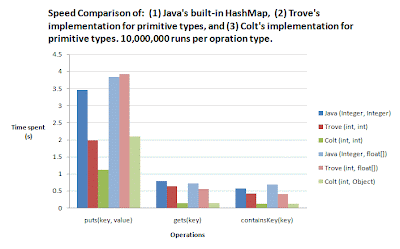
Not too surprisingly, Java's built-in implementation is the slowest, and consumes the largest amount of memory among the three, since it stores objects instead of primitive types (e.g., instead of storing the number 3 as an int, it stores it as an Integer). What WAS surprisingly, however, was that Colt's implementation was SO MUCH faster than Java's implementation. For example, for a int->int hashmap, running 10,000,000 puts() with Colt took less than
1/3 of the time. Running 10,000,000 gets() took less than
1/6, and 10,000,000 containsKey() less than
1/5! This is some substantial timing saving. This time-saving advantage is still there, even when we use a int->float[] hashmap.
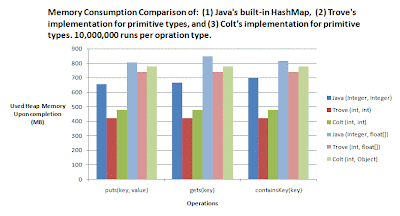
Memory-wise, the primitive implementations from Trove and Colt don't save us that much. For int->int hashmap, both Trove and Colt save us about 30% of memory, but for int->float[] (each float[] value has length 5) save us less than 10%. Nevertheless, there's still some saving.
Since I need to deal with large data sets, where it's common to use hashmaps with millions of entries, I'll use the Colt implementation from now on, for both it's impressive time saving and (slighly) lower memory consumption.
Here's the code I used for evaluating int->float[] hashmap. To get the timing and memory consumption for one implementation, comment out the other two that you DON'T want. You will also need to pass in these arguments to the VM, so enough heap memory will be alocated "-Xms1200M -Xmx1200M".
import java.util.HashMap;

import cern.colt.map.OpenIntIntHashMap;
import cern.colt.map.OpenIntObjectHashMap;
import gnu.trove.TIntIntHashMap;
import gnu.trove.TIntObjectHashMap;


public class Compare {

 public static void main(String args[]){

  System.out.println("1st line: time used(s)\n2nd line: heap memory used so far(MB)");

  int n = 10000000;

  long startTime = System.nanoTime();
  long startHeapSize = Runtime.getRuntime().freeMemory();


  // BEGIN: benchmark for Java's built-in hashmap
  System.out.println("\n===== Java's built-in HashMap =====");
  HashMap jIntIntMap = new HashMap();

  System.out.println("\n-- " + n + " puts(key, value) --");
  startTime = System.nanoTime();
  for (int i = 0; i < n; i++) { jIntIntMap.put(i,new float[]{0f,1f,2f,3f,4f}); }
  System.out.println( (System.nanoTime() - startTime) / 1000000000.0 );
  System.out.println( (startHeapSize - Runtime.getRuntime().freeMemory()) /1048576.0  );

  System.out.println("\n-- " + n + " gets(key) --");
  startTime = System.nanoTime();
  for (int i = 0; i < n; i++) { jIntIntMap.get(i); }
  System.out.println( (System.nanoTime() - startTime) / 1000000000.0 );
  System.out.println( (startHeapSize - Runtime.getRuntime().freeMemory()) /1048576.0  );

  System.out.println("\n-- " + n + " containsKey(key) --");
  startTime = System.nanoTime();
  for (int i = 0; i < n; i++) { jIntIntMap.containsKey(i); }
  System.out.println( (System.nanoTime() - startTime) / 1000000000.0 );
  System.out.println( (startHeapSize - Runtime.getRuntime().freeMemory()) /1048576.0  );
  // END


  // BEGIN: benchmark for Trove's TIntIntHashMap
  System.out.println("\n===== Trove's TIntIntHashMap =====");
  TIntObjectHashMap tIntIntMap = new TIntObjectHashMap();

  System.out.println("\n-- " + n + " puts(key, value) --");
  startTime = System.nanoTime();
  for (int i = 0; i < n; i++) { tIntIntMap.put(i,new float[]{0f,1f,2f,3f,4f}); }
  System.out.println( (System.nanoTime() - startTime) / 1000000000.0 );
  System.out.println( (startHeapSize - Runtime.getRuntime().freeMemory()) /1048576.0  );

  System.out.println("\n-- " + n + " gets(key) --");
  startTime = System.nanoTime();
  for (int i = 0; i < n; i++) { tIntIntMap.get(i); }
  System.out.println( (System.nanoTime() - startTime) / 1000000000.0 );
  System.out.println( (startHeapSize - Runtime.getRuntime().freeMemory()) /1048576.0  );

  System.out.println("\n-- " + n + " containsKey(key) --");
  startTime = System.nanoTime();
  for (int i = 0; i < n; i++) { tIntIntMap.containsKey(i); }
  System.out.println( (System.nanoTime() - startTime) / 1000000000.0 );
  System.out.println( (startHeapSize - Runtime.getRuntime().freeMemory()) /1048576.0  );
  // END

  // BEGIN: benchmark for Colt's OpenIntIntHashMap
  System.out.println("\n===== Colt's OpenIntIntHashMap =====");
  OpenIntObjectHashMap cIntIntMap = new OpenIntObjectHashMap();

  System.out.println("\n-- " + n + " puts(key, value) --");
  startTime = System.nanoTime();
  for (int i = 0; i < n; i++) { cIntIntMap.put(i,new float[]{0f,1f,2f,3f,4f}); }
  System.out.println( (System.nanoTime() - startTime) / 1000000000.0 );
  System.out.println( (startHeapSize - Runtime.getRuntime().freeMemory()) /1048576.0  );

  System.out.println("\n-- " + n + " gets(key) --");
  startTime = System.nanoTime();
  for (int i = 0; i < n; i++) { cIntIntMap.get(i); }
  System.out.println( (System.nanoTime() - startTime) / 1000000000.0 );
  System.out.println( (startHeapSize - Runtime.getRuntime().freeMemory()) /1048576.0  );

  System.out.println("\n-- " + n + " containsKey(key) --");
  startTime = System.nanoTime();
  for (int i = 0; i < n; i++) { cIntIntMap.containsKey(i); }
  System.out.println( (System.nanoTime() - startTime) / 1000000000.0 );
  System.out.println( (startHeapSize - Runtime.getRuntime().freeMemory()) /1048576.0  );
  // END


 }

}

 Here's the code I used for evaluating int->float[] hashmap. To get the timing and memory consumption for one implementation, comment out the other two that you DON'T want. You will also need to pass in these arguments to the VM, so enough heap memory will be alocated "-Xms1200M -Xmx1200M".
